.png&w=3840&q=30)
.png&w=3840&q=90)
WHX Dubai 2026 Email Template Tutorial: Article & Video Guide
Complete guide for sending WHX Dubai 2026 invitations - World Health Expo (Formerly Arab Health). BCC technique, daily limits & best practices. Same process as IRIA tutorial.
WHX Dubai 2026 Email Template Tutorial: Article & Video Guide
Welcome Team Phantom! 🎯 This guide shows you how to send our WHX Dubai 2026 invitation emails to clients.
✅ Same Process as IRIA Tutorial
The steps, images, videos, and PDF resources in this tutorial are exactly the same as our IRIA 2026 Email Template Tutorial. We've reused them because the process is identical.
What's different? Only the actual email template embedded below - it contains WHX Dubai 2026 event details instead of IRIA 2026.
📚 This tutorial includes:
- 📝 Complete Article - Step-by-step written guide (same as IRIA)
- 🎬 Video Tutorial - Visual walkthrough (same process as IRIA)
- 📄 PDF Guide - Downloadable reference (same steps as IRIA)
- 📧 Email Template Embed - Copy the actual WHX template directly
⚠️ Important: Browser Compatibility Notice
This HTML formatting preservation method works BEST on:
- ✅ Google Chrome on Desktop (Windows/Mac) - RECOMMENDED
- ✅ Microsoft Edge on Desktop
- ✅ Firefox on Desktop
DO NOT use with:
- ❌ Microsoft Outlook Desktop App
- ❌ Apple Mail App
- ❌ Any MS Office/Mac Office email applications
- ❌ Mobile email apps (Gmail app, Outlook app, etc.)
Why? Desktop browsers preserve the HTML formatting perfectly when using this method. Email applications and mobile apps often strip or modify the HTML code, breaking the responsive design.
For best results: Always compose and send these emails using Gmail in Chrome browser on Desktop.
🎯 Event Details at a Glance
Before we dive into the tutorial, here's what we're promoting:
| Detail | Information | |--------|-------------| | Event | WHX 2026 (World Health Expo Dubai) - Formerly Arab Health | | Dates | 9th to 12th February 2026 | | Venue | DEC (Dubai Exhibition Center), Expo City Dubai | | Our Stall | N21.K110 | | Address | 99, 2020 Boulevard, Madinat Al Mataar, Near Dubai Expo 2020 Metro Station, Expo City Dubai, UAE | | Virtual Stand | Click here to visit |
"WHX Dubai 2026 (formerly Arab Health) is the world's premier gathering for healthcare professionals and medical technology innovators in the Middle East, Gulf, and African regions. Let's make Stall N21.K110 a beacon of excellence!" - Team Phantom Healthcare
📝 Important Note About This Tutorial
All steps, images, videos, and PDF resources are identical to our IRIA 2026 Email Template Tutorial.
Why? Because the email sending process is exactly the same:
- Same BCC technique
- Same batch sending limits
- Same Gmail compose method
- Same copy-paste approach
- Same troubleshooting tips
Only the email template content differs - this tutorial has the WHX Dubai 2026 template embedded below with the correct event details, venue, dates, and virtual stand link.
📧 Step-by-Step Email Sending Tutorial
Step 1: Open the Email Template
You will receive the email template from your manager or team lead. Open that email in your inbox (Gmail or Google Workspace).
💡 Alternative: You can also copy the template directly from the embedded email preview available in this blog (scroll down to "Copy Email Template Directly" section). Use Google Chrome on Desktop for best results when pasting the content.
What you'll see:
- A professionally designed invitation with Phantom Healthcare branding
- The WHX Dubai 2026 event details
- Our stall number (N21.K110)
- Contact information and social media links
- Interactive button linking to our virtual stand
Step 2: Select and Copy the Email Content
⚠️ CRITICAL: Follow this EXACTLY
-
DO NOT use Ctrl+A (Select All) - This will copy headers, subject line, and reply buttons which will break the formatting
-
Use your mouse to manually select:
- Start from the TOP of the email content (just below the subject line area)
- Drag down to the BOTTOM of the email content (just before the "Unsubscribe" text or footer)
- Your selection should include ONLY the email body content
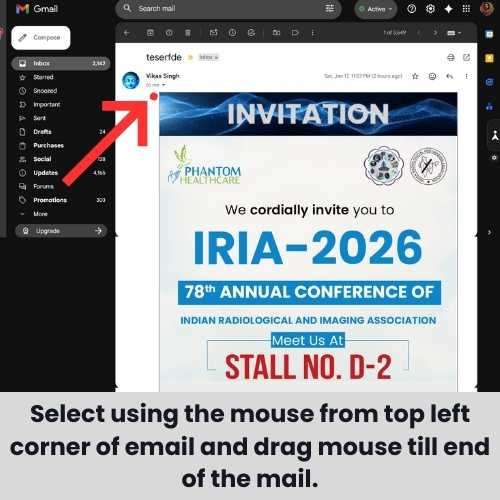
- Copy the selected content:
- Press Ctrl+C (Windows) or Cmd+C (Mac)
- Or Right-click → Copy

Step 3: Compose a New Email
- Click Compose (Gmail) or New Email (other clients)
- IMPORTANT: Remove your email signature first!
- Click on the signature area at the bottom
- Delete it completely
- Our email template already has all contact information
Step 4: Paste the Email Template
- Click inside the email body area
- Press Ctrl+V (Windows) or Cmd+V (Mac) to paste
- The entire responsive email should appear with all formatting intact

Why this works: Our template is designed using Beefree and copied from preview mode, which preserves responsiveness even in Gmail/Outlook compose windows.
Step 5: Add Recipients Using BCC
⚠️ VERY IMPORTANT: Always use BCC for multiple recipients
Why BCC is critical:
- Protects recipient privacy (no one sees other email addresses)
- Looks professional - each recipient thinks they received a personal email
- Required for GDPR/privacy compliance
- Prevents "Reply All" disasters
How to add BCC recipients:
- Click on BCC field (next to "To" field)
- Add recipient email addresses separated by commas
- Leave the "To" field empty OR add your own email address
- Recommended: Put your own email in "To" field to track delivery
Step 6: Add Subject Line
Use a clear, professional subject line:
Recommended Subject Lines (English):
Invitation: Meet Phantom Healthcare at WHX Dubai 2026 - Stall N21.K110Join us at World Health Expo Dubai | Phantom Healthcare - Feb 9-12, 2026Special Invitation: WHX Dubai 2026 - Stall N21.K110, DEC Exhibition Center
🌍 International Event - Consider Vernacular Languages
Since WHX Dubai 2026 targets international clients (Middle East, Gulf, Africa, Europe), you may use subject lines in native/vernacular languages:
Examples:
- Arabic (العربية):
دعوة: قابلنا في المعرض الصحي العالمي دبي 2026 - جناح N21.K110 - French:
Invitation: Rencontrez Phantom Healthcare au WHX Dubai 2026 - Stand N21.K110 - German:
Einladung: Treffen Sie Phantom Healthcare auf der WHX Dubai 2026 - Stand N21.K110
⚠️ CRITICAL: Always discuss with your manager/team lead before using non-English subject lines. Consider:
- Recipient's preferred language
- Regional targeting
- Professional context
- Company guidelines
📝 Important: Use Different Subject Line Variations
To avoid spam filters, use multiple versions of subject lines - don't send the same subject repeatedly:
- Batch 1: "Invitation: Meet us at WHX Dubai 2026 - Stall N21.K110"
- Batch 2: "Join Phantom Healthcare at World Health Expo Dubai, Feb 9-12"
- Batch 3: "Special Invite: WHX 2026 Dubai - Visit Our Stall N21.K110"
- Batch 4: "World Health Expo Dubai 2026 - Phantom Healthcare awaits you"
Varying subject lines improves deliverability and looks more natural.
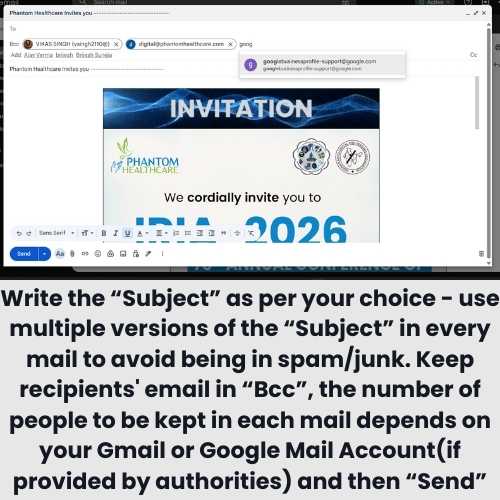
Step 7: Send in Batches
⚠️ CRITICAL: Follow batch limits to avoid spam filters!
| Email Account Type | Max per Batch | Wait Between Batches | Daily Limit | |--------------------|---------------|---------------------|-------------| | Free Gmail (@gmail.com) | 10-15 | 15-20 minutes | 100-150/day | | Google Workspace (@phantomhealthcare.com) | 15-20 | 15 minutes | 2000/day |
Batch Sending Process:
- Batch 1: Add 10-15 BCC recipients → Send
- Wait 15-20 minutes (do other work)
- Batch 2: Add next 10-15 BCC recipients → Send
- Repeat until all contacts are covered
- Track: Keep a list of who you've sent to
🚨 Important Precautions
Do's ✅
- ✅ Always use BCC for multiple recipients
- ✅ Remove your signature before pasting
- ✅ Send in small batches (10-15 at a time)
- ✅ Wait 15-20 minutes between batches
- ✅ Keep track of sent emails in a spreadsheet
- ✅ Personalize subject line if sending individually
- ✅ Test by sending to yourself first
- ✅ Check spam folder if test email doesn't arrive
Don'ts ❌
- ❌ Never use Ctrl+A to select - breaks formatting
- ❌ Never add all recipients in "To" or "CC" field
- ❌ Never send more than 15 emails in one batch
- ❌ Never exceed daily sending limits
- ❌ Don't send same email to same person twice
- ❌ Don't forward the email - always paste fresh
🗓️ Emoji Tip: Avoid Date Confusion!
⚠️ Calendar Emoji Warning:
If you're customizing the template with emojis, be careful with calendar emojis:
| Emoji | Name | What it Shows | Use? | |-------|------|---------------|------| | 📅 | Calendar | July 17 (World Emoji Day) | ❌ Confusing! | | 📆 | Tear-off Calendar | 31 | ❌ Confusing! | | 🗓️ | Spiral Calendar | Generic lines | ✅ Safe to use! |
Why it matters: Recipients may see "July 17" or "31" and think those are the event dates instead of 9-12 Feb 2026!
Safe alternative: Use 🗓️ (Spiral Calendar) which shows generic calendar lines, or simply use text without date emojis.
📱 Why Our Template Works Everywhere
We designed this email using Beefree and use a professional HTML Content Transfer Protocol from preview mode. This ensures:
- ✅ Responsive design - looks great on desktop AND mobile
- ✅ Consistent rendering - works in Gmail, Outlook, Apple Mail
- ✅ Images display correctly - properly linked and sized
- ✅ CTA buttons work - all links functional
- ✅ No code stripping - Gmail doesn't remove our styling
Traditional email marketing tools (Mailchimp, Constant Contact) are great for mass emails, but for personal sending by sales executives, this copy-paste method gives better deliverability and personal touch.
📋 Copy Email Template Directly
If you haven't received the email template from your manager, you can copy it directly from the embedded preview below.
🖥️ Desktop Chrome Browser Required
This embedded template is designed to work only in Google Chrome on Desktop. The copy buttons will copy the entire email template with formatting preserved.
Steps:
- Click the "📋 Copy Email Template" button below
- Open Gmail in Chrome browser
- Click Compose → Remove signature → Paste (Ctrl+V)
- Add BCC recipients and subject line
- Send!
✅ Actual WHX Dubai 2026 Template Below
This embedded template contains the correct WHX Dubai 2026 event details:
- Event: WHX 2026 (World Health Expo, formerly Arab Health)
- Dates: 9-12 February 2026
- Venue: DEC, Expo City Dubai
- Our Stall: N21.K110
- Virtual Stand Link: Already embedded in the "CLICK TO VISIT OUR VIRTUAL STAND" button
How to use:
- Click "📋 Copy Email Template" button below OR
- Use your mouse to select the entire email preview and copy manually (Ctrl+C)
- Open Gmail in Chrome (Desktop)
- Compose → Remove signature → Paste (Ctrl+V)
- Add BCC recipients + subject line → Send!
⚠️ Important:
- The "CLICK TO VISIT OUR VIRTUAL STAND" button links to: https://connections.whxevents.com/event/whx-dubai-2026/exhibitor/RXhoaWJpdG9yXzIzMzc3NDE%3D
- Test the button by sending yourself a test email first
- If it doesn't work, ask your manager for the updated template
📋 Copy Email Template Directly
Click the button below to copy the WHX Dubai 2026 email template. Then paste it into a new Gmail compose window.
Note: Works best in Google Chrome on Desktop. Make sure to remove your email signature before pasting.
⚠️ Copy Button Not Working?
The copy button may not work in all browsers. If it doesn't copy properly:
- Manual Selection: Use your mouse to select the email content inside the preview above, then Ctrl+C to copy
- Or request the template email directly from your manager
- The copy button works best in Chrome Desktop
🌐 Virtual Stand Link
Our virtual stand at WHX Dubai 2026 is now live! You can visit or share this link:
🔗 WHX Dubai 2026 Virtual Stand
Link: https://connections.whxevents.com/event/whx-dubai-2026/exhibitor/RXhoaWJpdG9yXzIzMzc3NDE%3D
⚠️ Important Note:
- This link is already embedded in the "CLICK TO VISIT OUR VIRTUAL STAND" button in the email template above
- Test the button by sending yourself a test email first
- If the button doesn't work in the email, you can share this direct link
Where to use this link:
- ✅ Already embedded in the email template button (no action needed)
- ✅ Share separately on WhatsApp messages
- ✅ Add to LinkedIn posts and updates
- ✅ Include in your email signatures
- ✅ Post on social media channels (Facebook, Instagram, Twitter)
- ✅ Share in professional groups and forums
Pro Tip: When sharing on social media, use this message template:
"🎯 Visit us at WHX Dubai 2026 (World Health Expo, formerly Arab Health) from 9-12 Feb 2026!
📍 Stall N21.K110, DEC (Dubai Exhibition Center)
Can't make it in person? Visit our Virtual Stand: [link]
Discover our latest radiology equipment and healthcare solutions. See you there! 🚀"
📊 Daily Sending Limits - Quick Reference
Free Gmail Account (@gmail.com)
| Limit Type | Amount | |------------|--------| | Emails per day | 100-150 | | Recipients per email (BCC) | 100 | | Emails per minute | ~20 | | Recommended per batch | 10-15 | | Cooldown between batches | 15-20 min |
Google Workspace Account (@phantomhealthcare.com)
| Limit Type | Amount | |------------|--------| | Emails per day | 2,000 | | Recipients per email (BCC) | 2,000 | | External recipients per day | 3,000 | | Recommended per batch | 15-20 | | Cooldown between batches | 15 min |
Pro Tip: Start with lower numbers on new accounts. Google monitors sending patterns and may flag sudden increases as suspicious activity.
🎯 Target Audience for Invitations
Send invitations to:
- ✅ Active clients (hospitals, clinics, diagnostic centers)
- ✅ Prospective leads in your pipeline
- ✅ Hospital/clinic managers and owners
- ✅ Radiologists and imaging technologists
- ✅ Medical equipment procurement officers
- ✅ Healthcare administrators
- ✅ Doctors you've worked with
- ✅ International healthcare contacts in Middle East and Gulf region
Priority List:
- Decision makers who can visit Dubai Exhibition Center
- Existing customers for relationship building
- Warm leads who showed interest in our products
- Industry contacts and networking connections in UAE and surrounding countries
📞 Important: Coordinate with Your Team
⚠️ Please divide the email list among team members to ensure multiple emails don't get sent to the same person. Discuss with your manager or team lead before starting your email campaign to avoid duplicate sends and maintain professionalism.
🆘 Troubleshooting
Email looks broken after pasting?
- Make sure you selected ONLY the email body content
- Don't use Ctrl+A - use mouse selection
- Try pasting in a new compose window
- Check if signature was removed before pasting
Email going to spam?
- Send in smaller batches (5-10)
- Increase wait time between batches (30 min)
- Add a personal line at the top like "Dear [Name],"
- Avoid spam trigger words in subject line
Images not showing?
- This is normal for first view in some email clients
- Recipients need to click "Display images" once
- All images are properly hosted and will load
Copy button not working?
- Make sure you're using Chrome Desktop (not mobile)
- Try manually selecting the email with your mouse
- Right-click the email preview and select "Copy"
- Request the template email from your manager as alternative
📞 Need Help?
If you face any issues:
- Template access: Contact your manager or copy from the embedded template above in this blog
- Event queries: Contact marketing team
- Technical issues: Contact Digital Marketing - digital@phantomhealthcare.com
✅ Quick Checklist Before Sending
Use this checklist for every batch:
- [ ] Template copied correctly (mouse selection, not Ctrl+A)
- [ ] Signature removed from compose window
- [ ] Template pasted and looks correct
- [ ] Subject line added (with variations for different batches)
- [ ] Recipients added in BCC field only
- [ ] Batch size: 10-15 recipients max
- [ ] Previous batch was 15+ minutes ago
- [ ] Haven't exceeded daily limit
- [ ] Sent test email to yourself first
- [ ] Button link to virtual stand is working
Let's make WHX Dubai 2026 a huge success! See you at Stall N21.K110, Dubai Exhibition Center! 🚀
— Team Phantom Healthcare🎬 Complete Video Tutorial
Watch this complete video tutorial to see the entire process in action:
📹 Note: This video was created for the IRIA 2026 invitation tutorial, but because all steps are exactly the same, this tutorial will help you in the same way for WHX Dubai 2026 invitations.
Only difference: The email template content (event details) - which you'll copy from the WHX template embedded above instead of IRIA.
Video Tutorial: How to Copy and Send Email Template (Duration: 2:42) | Process applies to all event invitation emails
📄 Downloadable PDF Guide
For offline reference, download our comprehensive PDF guide with all the steps and screenshots:
📄 Note: This PDF guide was created for the IRIA 2026 invitation tutorial, but because all steps are exactly the same, this guide will help you in the same way for WHX Dubai 2026 invitations.
Only difference: The email template content (event details) - which you'll copy from the WHX template embedded above instead of IRIA.
📥 Download PDF Guide
Complete step-by-step guide with screenshots | Process applies to all event invitation emails
Tags
About the Author

Vikas Singh "विमुक्त"
Editor of CogniSocial Research
Software Professional, Social Psychologist, Digital Marketer, Environmental & Civil Rights Activist. Researching how digital platforms shape human cognition and behavior, while advocating for social justice, environmental protection, and civil liberties.
Learn More About Author
Social Linksconnect with me